

Zemismart recently released a new mmWave presence sensor, labeled as model ZPS-Z1. This is a battery-powered presence sensor with a 24GHz radar and a 5-meter detection range. It’s equipped with an illuminance sensor as well as a mechanism for tuning out false triggers.
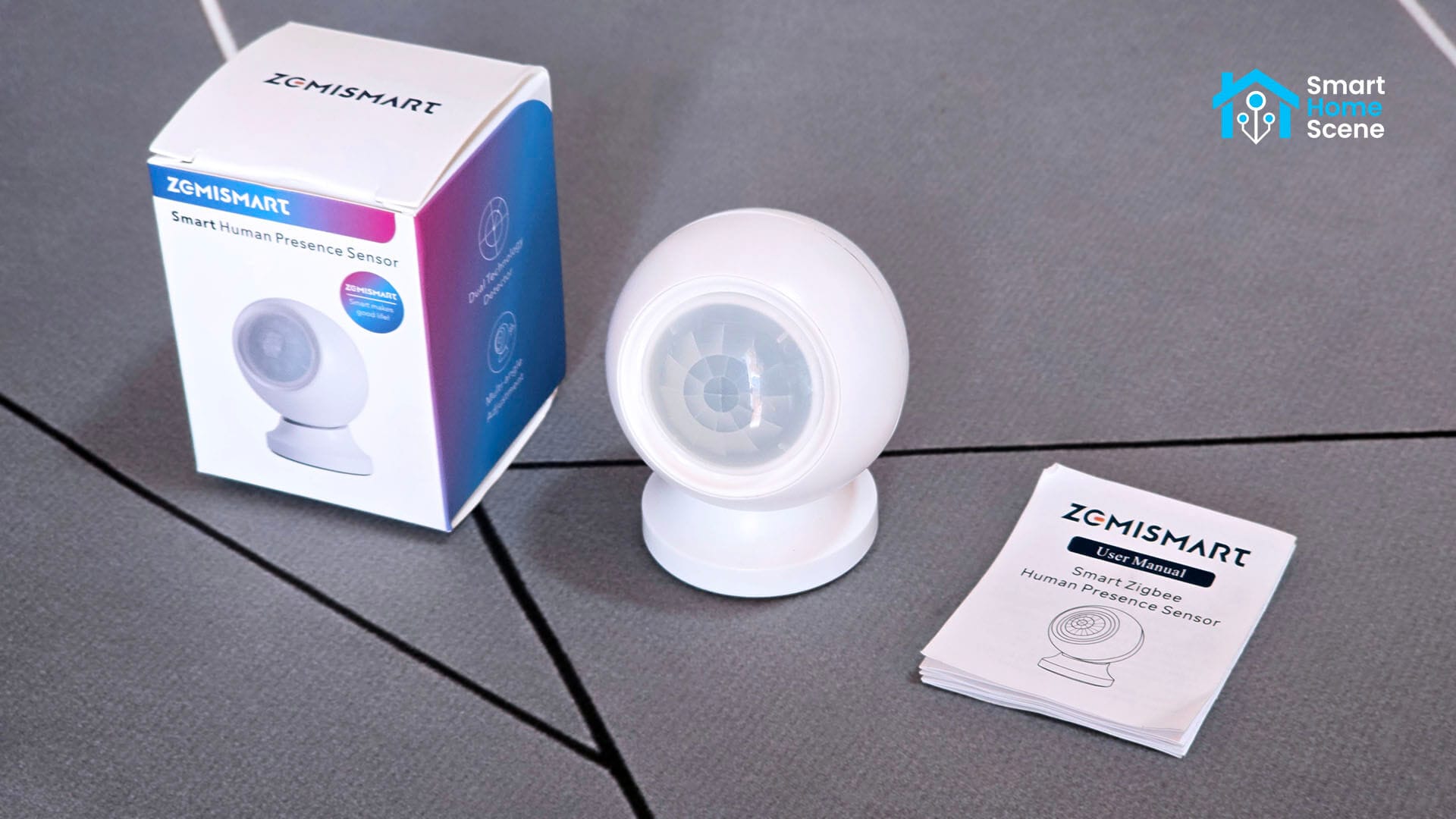
In this article, I’m sharing my review of the Zemismart ZPS-Z1 Presence Sensor. Since this device is so new, it hasn’t found its way into Zigbee2MQTT or ZHA yet. However, I made a fully working external converter (Z2M) and custom quirk (ZHA) which I’ve shared below and opened PRs on GitHub so everyone can use it.
You can get it on AliExpress, AliExpress 2 or Zemismart’s Official Webstore.
What’s Inside the Zemismart ZPS-Z1?
The Zemismart ZPS-Z1 ships in a small box containing the sensor, a magnetic mounting stand and a user manual. The device measures 48.9mm in diameter from the front side, which isn’t too large or too small. With the mount attached, the sensor becomes about 63mm tall.
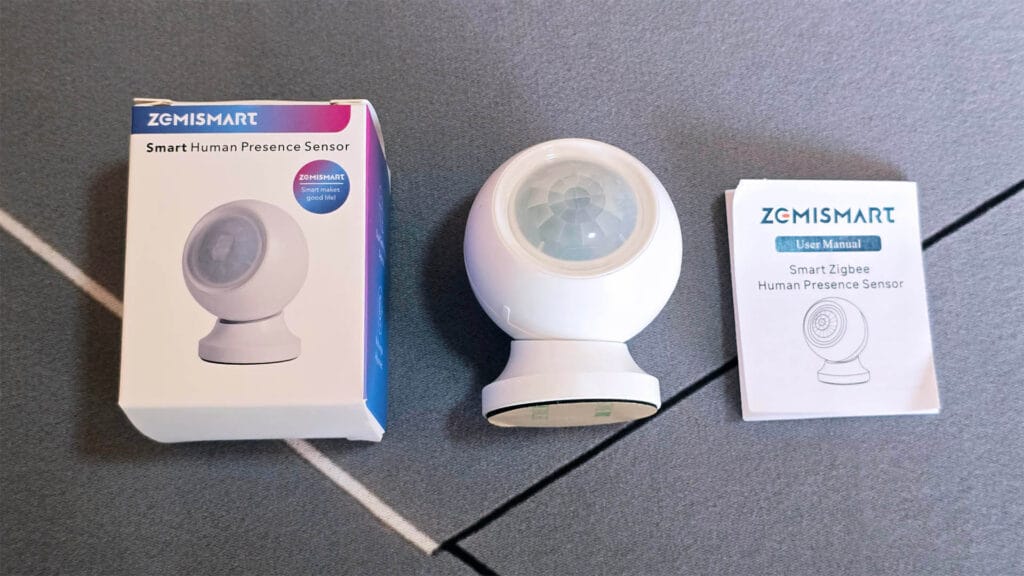
The magnetic mounting stand snaps into place incredibly well, and can be freely moved across the entire back of the sensor. There is no fixed position, which gives you the flexibility to install it however you see fit. There’s also a 3M sticker pre-applied to the bottom of the stand for installation.
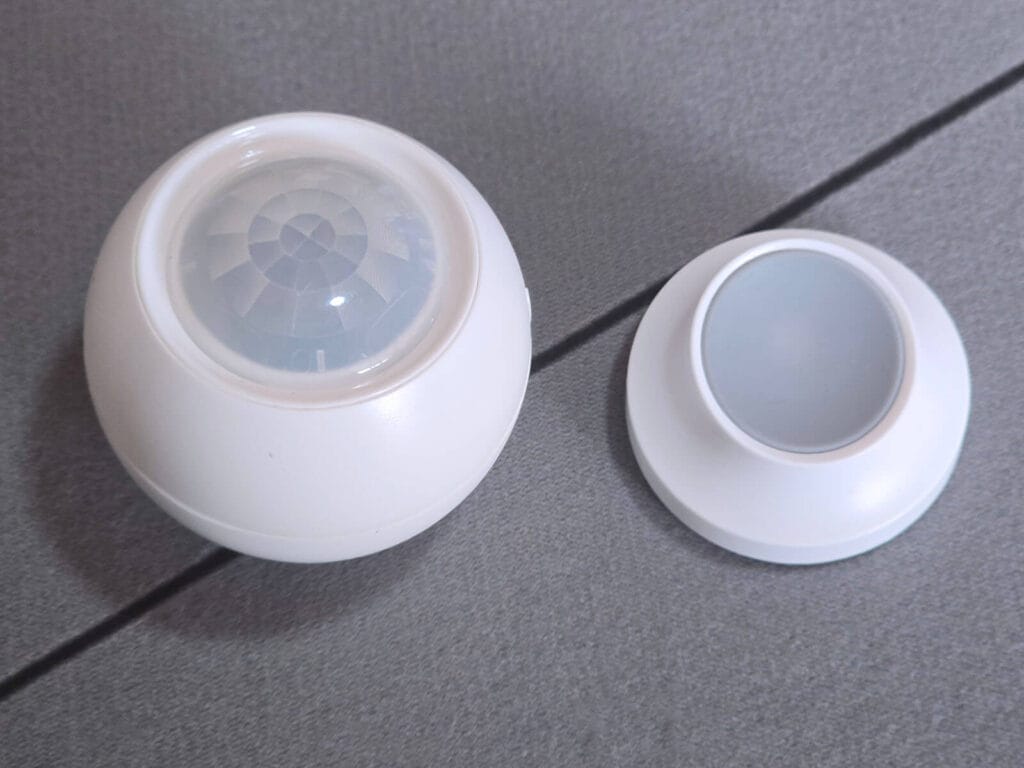
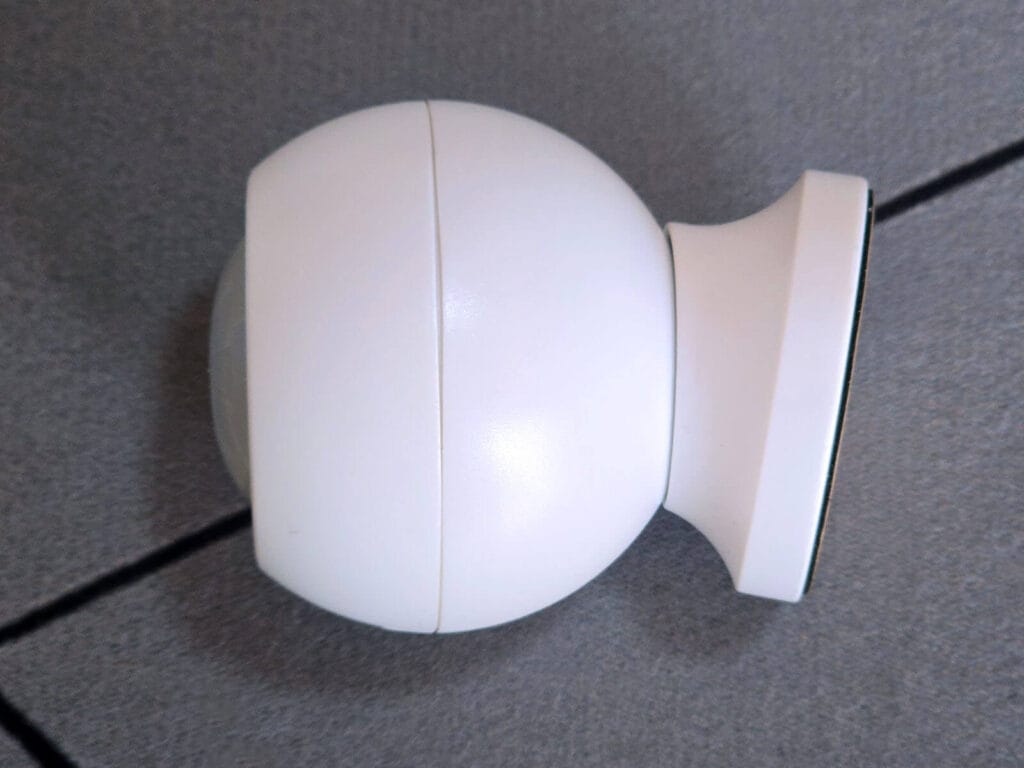
This device is powered by a single CR2450 coin cell battery, just like the tiny ZG-204ZP sensor I recently covered. The pairing button is also found underneath the back cover, which means you do need to open the case before you can pair the sensor.
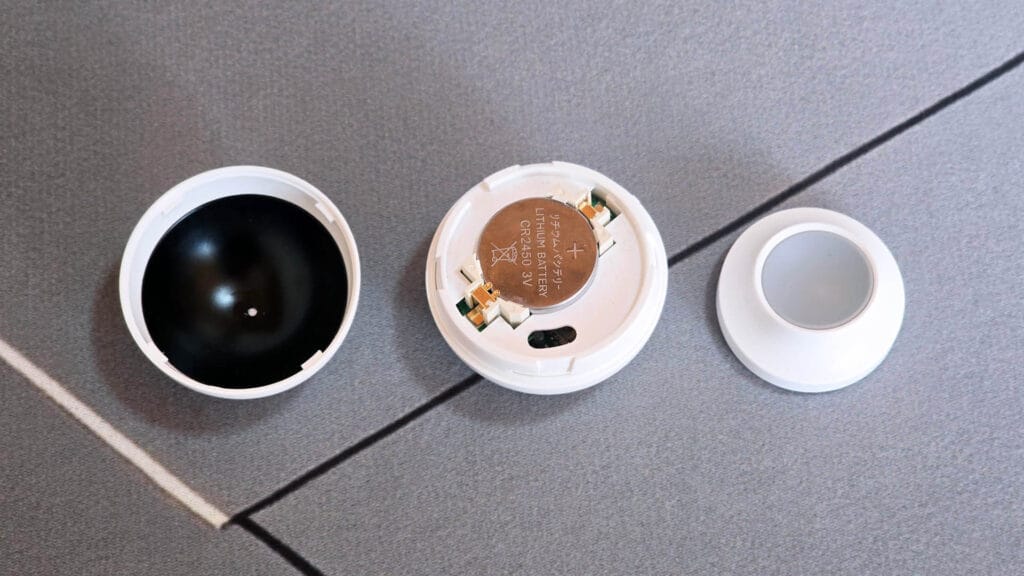
Once I pried it open, I was able to inspect the internal components. I was curious to learn what kind of mmWave radar this device uses and whether it uses a PIR sensor or not. Turns out, the ZPS-Z1 relies only on the Possumic RS2111 [Datasheet] 24GHz mmWave radar for detecting both movement and static presence.
This particular sensor is highlighted as having ultra-low power consumption, drawing just 4μA+ during motion and presence events. This number theoretically puts it on the same power level as a traditional PIR sensor, despite being a full mmWave radar, as Possumic claim so themselves. This is very impressive, but remains to be tested in practice. For reference, the Aqara FP300 and SwitchBot Presence Sensor also use a Possumic 60GHz mmWave radar [RS6130]. Both are battery-powered sensors.
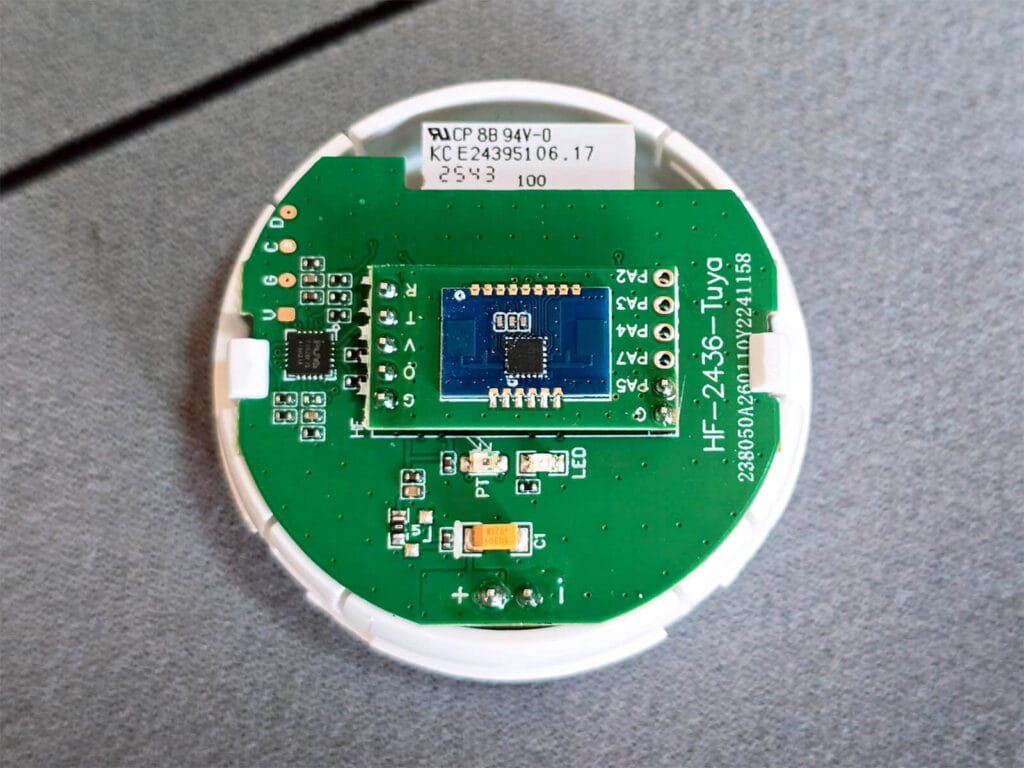
For connectivity, the Zemismart ZPS-Z1 uses the well-known Tuya ZTU Module [Datasheet], which can be considered the gold-standard for battery-powered Tuya devices at this point. It communicates and pairs well with any Zigbee coordinator, including the latest Silabs MG26 chip, which I’m currently testing this on.
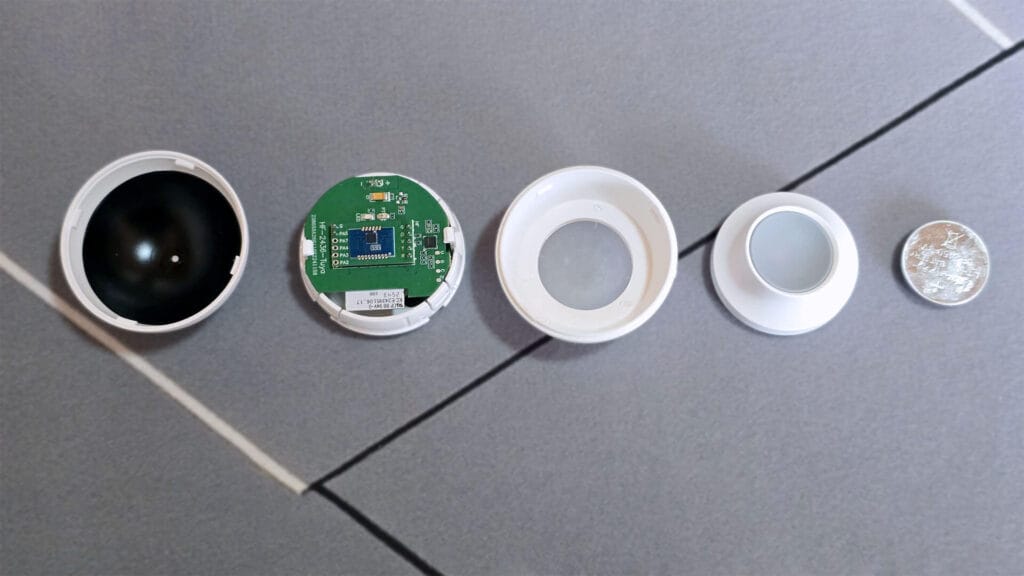
Here’s what the ZPS-Z1 looks like once fully disassembled:
Zemismart ZPS-Z1 Home Assistant Integration
Obviously, for using this sensor in Home Assistant you have two options: ZHA or Zigbee2MQTT. Neither has support for the ZPS-Z1 out of the box at the moment, so you will need to add and use an external converter or custom quirk.
I made both and shared them freely with the community, you can find them on Github here: ZHA #4864 and Zigbee2MQTT #11791. If you prefer integrating manually and can’t wait, here’s the code for each:
External Converter for Zigbee2MQTT
'use strict';

// ─── Constants ────────────────────────────────────────────────────────────────

const TUYA_CLUSTER = 'manuSpecificTuya';

const DP = {
    PRESENCE_STATE:     1,
    DETECTION_RANGE:    2,
    ILLUMINANCE:        101,
    ENERGY_VALUE:       102,
    AI_SELF_LEARNING:   103,
    HEARTBEAT_ENABLE:   104,
    HEART:              105,
    SENSITIVITY_PRESET: 112,
    ZONE_MAP:           117,
    NO_PERSON_TIME:     119,
    INDICATOR:          123,
    ENERGY_THRESHOLD:   124,
};

const DT = { RAW: 0x00, BOOL: 0x01, VALUE: 0x02, ENUM: 0x04 };

const ZONE_COUNT = 10;

// ─── Scaling helpers (0–100 ↔ 0–255) ─────────────────────────────────────────

function toApp(raw)  { return Math.round((raw  / 255) * 100); }
function toRaw(app)  { return Math.round((app  / 100) * 255); }

// ─── Keep-alive (DP104) ──────────────────────────────────────────────────────

const keepAliveTimers = {};

function startKeepAlive(device, endpoint) {
    stopKeepAlive(device.ieeeAddr);
    keepAliveTimers[device.ieeeAddr] = setInterval(async () => {
        try {
            await endpoint.command(
                TUYA_CLUSTER, 'dataRequest',
                { seq: Math.round(Math.random() * 0xFFFF), dpValues: [{ dp: DP.HEARTBEAT_ENABLE, datatype: DT.BOOL, data: [1] }] },
                { disableDefaultResponse: true },
            );
        } catch (_) { /* transient error — will retry in 5 s */ }
    }, 5000);
}

function stopKeepAlive(ieeeAddr) {
    if (keepAliveTimers[ieeeAddr]) {
        clearInterval(keepAliveTimers[ieeeAddr]);
        delete keepAliveTimers[ieeeAddr];
    }
}

// ─── Helpers ──────────────────────────────────────────────────────────────────

async function sendDP(endpoint, dp, datatype, data) {
    await endpoint.command(
        TUYA_CLUSTER, 'dataRequest',
        { seq: Math.round(Math.random() * 0xFFFF), dpValues: [{ dp, datatype, data }] },
        { disableDefaultResponse: true },
    );
}

/** Read current cached zone active states from Z2M state, falling back to true (active). */
function currentZoneArray(meta) {
    const state = meta.state ?? {};
    return Array.from({ length: ZONE_COUNT }, (_, i) => {
        const v = state[`zone_${i + 1}_active`];
        return (v === false) ? false : true;
    });
}

/** Encode array of zone active booleans → 10-byte Buffer. 1=active, 0=blocked. */
function encodeZoneMap(zones) {
    const buf = Buffer.alloc(ZONE_COUNT, 1);
    zones.forEach((active, i) => { buf[i] = active ? 1 : 0; });
    return buf;
}

/** Decode 20-byte energy/threshold Buffer → { a: number[10], b: number[10] } */
function decodeEnergyBuffer(data) {
    const buf = Buffer.isBuffer(data) ? data : Buffer.from(data);
    const a = [], b = [];
    for (let i = 0; i < ZONE_COUNT; i++) {
        a.push(buf[i] ?? 0);
        b.push(buf[ZONE_COUNT + i] ?? 0);
    }
    return { a, b };
}

/** Encode two number[10] arrays (raw 0–255) → 20-byte Buffer. */
function encodeEnergyBuffer(arrA, arrB) {
    const buf = Buffer.alloc(20, 0);
    for (let i = 0; i < ZONE_COUNT; i++) {
        buf[i]              = Math.max(0, Math.min(255, Math.round(arrA[i] ?? 0)));
        buf[ZONE_COUNT + i] = Math.max(0, Math.min(255, Math.round(arrB[i] ?? 0)));
    }
    return buf;
}

// ─── fromZigbee ───────────────────────────────────────────────────────────────
const fzConverter = {
    cluster: TUYA_CLUSTER,
    type: ['commandDataResponse', 'commandDataReport'],
    convert(model, msg, publish, options, meta) {
        const result = {};

        for (const dpv of (msg.data?.dpValues ?? [])) {
            const { dp, data } = dpv;
            const buf = Buffer.isBuffer(data) ? data : Buffer.from(data);

            switch (dp) {

                // ── DP1: Presence state ───────────────────────────────────────
                case DP.PRESENCE_STATE: {
                    const map = { 0: 'absence', 1: 'presence', 2: 'sensor_close' };
                    const state = map[buf[0]] ?? 'unknown';
                    result.presence_state = state;
                    result.occupancy = (state === 'presence');
                    break;
                }

                // ── DP2: Detection range ──────────────────────────────────────
                case DP.DETECTION_RANGE:
                    result.detection_range = buf.readUInt32BE(0);
                    break;

                // ── DP101: Illuminance ────────────────────────────────────────
                case DP.ILLUMINANCE:
                    result.illuminance = buf.readUInt32BE(0);
                    break;

                // ── DP102: Per-zone energy values (live, when streaming on) ───
                case DP.ENERGY_VALUE: {
                    if (buf.length < 20) break;
                    const { a: motion, b: presence } = decodeEnergyBuffer(buf);
                    for (let i = 0; i < ZONE_COUNT; i++) {
                        result[`zone_${i + 1}_motion_energy`]   = toApp(motion[i]);
                        result[`zone_${i + 1}_presence_energy`] = toApp(presence[i]);
                    }
                    break;
                }

                // ── DP103: Auto-calibration status ────────────────────────────
                case DP.AI_SELF_LEARNING: {
                    const map = { 0: 'standby', 1: 'start', 2: 'learning', 3: 'success', 4: 'fail', 5: 'cancel' };
                    result.auto_calibration_status = map[buf[0]] ?? 'unknown';
                    break;
                }

                // ── DP104: Energy streaming ack ───────────────────────────────
                case DP.HEARTBEAT_ENABLE:
                    result.energy_streaming = (buf[0] === 1);
                    break;

                // ── DP105: Device keepalive (no user-visible state) ───────────
                case DP.HEART:
                    break;

                // ── DP112: Sensitivity preset ─────────────────────────────────
                case DP.SENSITIVITY_PRESET: {
                    const map = { 0: 'high', 1: 'medium', 2: 'low', 3: 'custom' };
                    result.sensitivity_preset = map[buf[0]] ?? 'unknown';
                    break;
                }

                // ── DP117: Zone mode map ──────────────────────────────────────
                case DP.ZONE_MAP: {
                    if (buf.length < ZONE_COUNT) break;
                    for (let i = 0; i < ZONE_COUNT; i++) {
                        // 1 = active, 0 = blocked (shielded), 2 = treat as active
                        result[`zone_${i + 1}_active`] = (buf[i] !== 0);
                    }
                    break;
                }

                // ── DP119: Presence clear cooldown ────────────────────────────
                case DP.NO_PERSON_TIME:
                    result.presence_clear_cooldown = buf.readUInt32BE(0);
                    break;

                // ── DP123: LED indicator ──────────────────────────────────────
                case DP.INDICATOR:
                    result.led_indicator = (buf[0] === 1);
                    break;

                // ── DP124: Per-zone energy thresholds ─────────────────────────
                case DP.ENERGY_THRESHOLD: {
                    if (buf.length < 20) break;
                    const { a: motionThr, b: presenceThr } = decodeEnergyBuffer(buf);
                    // Cache raw values for safe read-modify-write in toZigbee
                    meta.device._lastThresholds = { motionThr: [...motionThr], presenceThr: [...presenceThr] };
                    for (let i = 0; i < ZONE_COUNT; i++) {
                        result[`zone_${i + 1}_motion_threshold`]   = toApp(motionThr[i]);
                        result[`zone_${i + 1}_presence_threshold`] = toApp(presenceThr[i]);
                    }
                    break;
                }

                default:
                    meta.logger.debug(`[ZPS-Z1] Unknown DP ${dp}: ${buf.toString('hex')}`);
            }
        }

        return result;
    },
};

// ─── toZigbee ─────────────────────────────────────────────────────────────────

const ZONE_ACTIVE_KEYS       = Array.from({ length: ZONE_COUNT }, (_, i) => `zone_${i + 1}_active`);
const ZONE_MOTION_THR_KEYS   = Array.from({ length: ZONE_COUNT }, (_, i) => `zone_${i + 1}_motion_threshold`);
const ZONE_PRESENCE_THR_KEYS = Array.from({ length: ZONE_COUNT }, (_, i) => `zone_${i + 1}_presence_threshold`);

const tzConverter = {
    key: [
        'detection_range',
        'sensitivity_preset',
        'presence_clear_cooldown',
        'led_indicator',
        'energy_streaming',
        'auto_calibration',
        ...ZONE_ACTIVE_KEYS,
        ...ZONE_MOTION_THR_KEYS,
        ...ZONE_PRESENCE_THR_KEYS,
    ],

    async convertSet(entity, key, value, meta) {
        const endpoint = meta.device.getEndpoint(1);

        // ── detection_range (DP2) ─────────────────────────────────────────────
        if (key === 'detection_range') {
            const clamped = Math.max(0, Math.min(500, Math.round(value / 50) * 50));
            const buf = Buffer.alloc(4);
            buf.writeUInt32BE(clamped, 0);
            await sendDP(endpoint, DP.DETECTION_RANGE, DT.VALUE, [...buf]);
            return { state: { detection_range: clamped } };
        }

        // ── sensitivity_preset (DP112) ────────────────────────────────────────
        if (key === 'sensitivity_preset') {
            const map = { high: 0, medium: 1, low: 2, custom: 3 };
            const val = map[value];
            if (val === undefined) throw new Error(`[ZPS-Z1] Invalid sensitivity_preset: ${value}`);
            await sendDP(endpoint, DP.SENSITIVITY_PRESET, DT.ENUM, [val]);
            return { state: { sensitivity_preset: value } };
        }

        // ── presence_clear_cooldown (DP119) ───────────────────────────────────
        if (key === 'presence_clear_cooldown') {
            const clamped = Math.max(2, Math.min(60, Math.round(value)));
            const buf = Buffer.alloc(4);
            buf.writeUInt32BE(clamped, 0);
            await sendDP(endpoint, DP.NO_PERSON_TIME, DT.VALUE, [...buf]);
            return { state: { presence_clear_cooldown: clamped } };
        }

        // ── led_indicator (DP123) ─────────────────────────────────────────────
        if (key === 'led_indicator') {
            const on = value === true || value === 'ON';
            await sendDP(endpoint, DP.INDICATOR, DT.BOOL, [on ? 1 : 0]);
            return { state: { led_indicator: on } };
        }

        // ── energy_streaming (DP104) ──────────────────────────────────────────
        if (key === 'energy_streaming') {
            const on = value === true || value === 'ON';
            await sendDP(endpoint, DP.HEARTBEAT_ENABLE, DT.BOOL, [on ? 1 : 0]);
            if (on) startKeepAlive(meta.device, endpoint);
            else stopKeepAlive(meta.device.ieeeAddr);
            return { state: { energy_streaming: on } };
        }

        // ── auto_calibration (DP103) ──────────────────────────────────────────
        if (key === 'auto_calibration') {
            const map = { start: 1, cancel: 5 };
            const cmd = map[value];
            if (cmd === undefined) throw new Error(`[ZPS-Z1] Invalid auto_calibration value: ${value}`);
            await sendDP(endpoint, DP.AI_SELF_LEARNING, DT.ENUM, [cmd]);
            return { state: {} };
        }

        // ── zone_N_active (DP117) ─────────────────────────────────────────────
        // Read-modify-write: update only the changed zone, preserve all others.
        if (ZONE_ACTIVE_KEYS.includes(key)) {
            const zoneIdx = parseInt(key.split('_')[1], 10) - 1;
            const active  = value === true || value === 'ON';
            const zones   = currentZoneArray(meta);
            zones[zoneIdx] = active;
            const buf = encodeZoneMap(zones);
            await sendDP(endpoint, DP.ZONE_MAP, DT.RAW, [...buf]);
            const stateUpdate = {};
            zones.forEach((a, i) => { stateUpdate[`zone_${i + 1}_active`] = a; });
            return { state: stateUpdate };
        }

        // ── zone_N_motion_threshold (DP124) ───────────────────────────────────
        // Value arrives as 0–100; convert to raw 0–255 before sending.
        if (ZONE_MOTION_THR_KEYS.includes(key)) {
            const zoneIdx = parseInt(key.split('_')[1], 10) - 1;
            const cached  = meta.device._lastThresholds;
            const state   = meta.state ?? {};
            const motionThr   = cached
                ? [...cached.motionThr]
                : Array.from({ length: ZONE_COUNT }, (_, i) => toRaw(state[`zone_${i + 1}_motion_threshold`]   ?? 50));
            const presenceThr = cached
                ? [...cached.presenceThr]
                : Array.from({ length: ZONE_COUNT }, (_, i) => toRaw(state[`zone_${i + 1}_presence_threshold`] ?? 50));
            motionThr[zoneIdx] = toRaw(Math.max(0, Math.min(100, Math.round(value))));
            const buf = encodeEnergyBuffer(motionThr, presenceThr);
            await sendDP(endpoint, DP.ENERGY_THRESHOLD, DT.RAW, [...buf]);
            await new Promise((r) => setTimeout(r, 150));
            await sendDP(endpoint, DP.SENSITIVITY_PRESET, DT.ENUM, [3]);
            const stateUpdate = { sensitivity_preset: 'custom' };
            motionThr.forEach((v, i)   => { stateUpdate[`zone_${i + 1}_motion_threshold`]   = toApp(v); });
            presenceThr.forEach((v, i) => { stateUpdate[`zone_${i + 1}_presence_threshold`] = toApp(v); });
            return { state: stateUpdate };
        }

        // ── zone_N_presence_threshold (DP124) ─────────────────────────────────
        if (ZONE_PRESENCE_THR_KEYS.includes(key)) {
            const zoneIdx = parseInt(key.split('_')[1], 10) - 1;
            const cached  = meta.device._lastThresholds;
            const state   = meta.state ?? {};
            const motionThr   = cached
                ? [...cached.motionThr]
                : Array.from({ length: ZONE_COUNT }, (_, i) => toRaw(state[`zone_${i + 1}_motion_threshold`]   ?? 50));
            const presenceThr = cached
                ? [...cached.presenceThr]
                : Array.from({ length: ZONE_COUNT }, (_, i) => toRaw(state[`zone_${i + 1}_presence_threshold`] ?? 50));
            presenceThr[zoneIdx] = toRaw(Math.max(0, Math.min(100, Math.round(value))));
            const buf = encodeEnergyBuffer(motionThr, presenceThr);
            await sendDP(endpoint, DP.ENERGY_THRESHOLD, DT.RAW, [...buf]);
            await new Promise((r) => setTimeout(r, 150));
            await sendDP(endpoint, DP.SENSITIVITY_PRESET, DT.ENUM, [3]);
            const stateUpdate = { sensitivity_preset: 'custom' };
            motionThr.forEach((v, i)   => { stateUpdate[`zone_${i + 1}_motion_threshold`]   = toApp(v); });
            presenceThr.forEach((v, i) => { stateUpdate[`zone_${i + 1}_presence_threshold`] = toApp(v); });
            return { state: stateUpdate };
        }

        meta.logger.warn(`[ZPS-Z1] convertSet: unhandled key "${key}"`);
    },

    async convertGet(entity, key, meta) {
        // TS0601 Tuya devices do not support ZCL attribute reads for DPs.
        // State is populated via the dataQuery in configure().
    },
};

// ─── Expose builders ──────────────────────────────────────────────────────────

const e  = require('zigbee-herdsman-converters/lib/exposes');
const ea = e.access;

function buildZoneActiveExposes() {
    return Array.from({ length: ZONE_COUNT }, (_, i) =>
        e.binary(`zone_${i + 1}_active`, ea.ALL, true, false)
            .withDescription(`${i * 50}\u2013${(i + 1) * 50}cm`),
    );
}

function buildEnergyExposes() {
    const items = [];
    for (let i = 1; i <= ZONE_COUNT; i++) {
        items.push(
            e.numeric(`zone_${i}_motion_energy`, ea.STATE)
                .withDescription(`Zone ${i} live motion energy (0–100).`)
                .withValueMin(0).withValueMax(100)
                .withCategory('diagnostic'),
            e.numeric(`zone_${i}_presence_energy`, ea.STATE)
                .withDescription(`Zone ${i} live presence energy (0–100).`)
                .withValueMin(0).withValueMax(100)
                .withCategory('diagnostic'),
        );
    }
    return items;
}

function buildThresholdExposes() {
    const items = [];
    for (let i = 1; i <= ZONE_COUNT; i++) {
        items.push(
            e.numeric(`zone_${i}_motion_threshold`, ea.ALL)
                .withDescription(`Zone ${i} motion trigger threshold (0–100). Switches sensitivity to custom.`)
                .withValueMin(0).withValueMax(100).withValueStep(1),
            e.numeric(`zone_${i}_presence_threshold`, ea.ALL)
                .withDescription(`Zone ${i} presence trigger threshold (0–100). Switches sensitivity to custom.`)
                .withValueMin(0).withValueMax(100).withValueStep(1),
        );
    }
    return items;
}

// ─── Device definition ────────────────────────────────────────────────────────
const definition = {
    zigbeeModel: ['TS0601'],
    model: 'ZPS-Z1',
    vendor: 'Zemismart',
    description: '24 GHz mmWave presence sensor',
    fromZigbee: [fzConverter],
    toZigbee: [tzConverter],

    onEvent: async (type, data, device) => {
        if (type === 'deviceLeave' || type === 'deviceRemoved') {
            stopKeepAlive(device.ieeeAddr);
        }
    },

    configure: async (device, coordinatorEndpoint, logger) => {
        const endpoint = device.getEndpoint(1);
        await endpoint.bind(TUYA_CLUSTER, coordinatorEndpoint);
        await endpoint.command(TUYA_CLUSTER, 'dataQuery', {}, { disableDefaultResponse: true });
        const log = logger?.debug ?? logger?.info ?? logger?.log ?? (() => {});
        log('[ZPS-Z1] Configured — initial state query sent.');
    },

    exposes: [
        // ── Primary presence & light ──────────────────────────────────────────
        e.binary('occupancy', ea.STATE, true, false)
            .withDescription('Binary presence detection. Person detected (true) or not detected (false).'),

        e.enum('presence_state', ea.STATE, ['absence', 'presence', 'sensor_close'])
            .withDescription(
                'absence — no one detected. ' +
                'presence — person detected. ' +
                'sensor_close — detection zone is physically obstructed or sensor is disabled.',
            ),

        e.numeric('illuminance', ea.STATE)
            .withUnit('lx')
            .withDescription('Ambient light level (0–1300 lx).')
            .withValueMin(0).withValueMax(1300),

        // ── Detection tuning ──────────────────────────────────────────────────
        e.numeric('detection_range', ea.ALL)
            .withUnit('cm')
            .withDescription('Maximum radar detection distance (0–500 cm, 50 cm steps). Firmware limits radar distance to 500 cm (5 meters).')
            .withValueMin(0).withValueMax(500).withValueStep(50),

        e.numeric('presence_clear_cooldown', ea.ALL)
            .withUnit('s')
            .withDescription('Presence clear time before the sensor switches state to "absence". (2–60 s).')
            .withValueMin(2).withValueMax(60).withValueStep(1),

        e.enum('sensitivity_preset', ea.ALL, ['high', 'medium', 'low', 'custom'])
            .withDescription(
                '"high" — detects subtle movement and stationary presence. ' +
                '"medium" — balanced default. ' +
                '"low" — only strong or close-range activity triggers detection. ' +
                '"custom" — per-zone thresholds active (set automatically when any zone threshold is written).',
            ),

        // ── Auto-calibration ──────────────────────────────────────────────────
        e.enum('auto_calibration', ea.SET, ['start', 'cancel'])
            .withDescription(
                'Trigger AI self-learning to auto-tune thresholds for your environment. ' +
                'Set to "start", leave the room for ~60 s, then check auto_calibration_status. ' +
                'Allow 5–10 minutes of sensor warm-up before first calibration run.',
            ),

        e.enum('auto_calibration_status', ea.STATE, ['standby', 'start', 'learning', 'success', 'fail', 'cancel'])
            .withDescription(
                '"standby" — idle. "start" — initiated. "learning" — in progress. ' +
                '"success" — thresholds updated. "fail" — failed. "cancel" — stopped by user.',
            ),

        // ── LED indicator ─────────────────────────────────────────────────────
        e.binary('led_indicator', ea.ALL, true, false)
            .withDescription('Physical LED indicator of the sensor.'),

        // ── Real-time energy streaming ────────────────────────────────────────
        e.binary('energy_streaming', ea.ALL, true, false)
            .withDescription(
                'Enable diagnostic per-zone radar energy reporting. ' +
                'Turn ON only when tuning thresholds, turn OFF when done to reduce Zigbee traffic.',
            ),

        // ── Per-zone live energy (DP102, diagnostic) ──────────────────────────
        ...buildEnergyExposes(),

        // ── Zone active toggles (DP117) ───────────────────────────────────────
        ...buildZoneActiveExposes(),

        // ── Per-zone thresholds (DP124) ───────────────────────────────────────
        ...buildThresholdExposes(),
    ],

    meta: {
        tuyaDatapoints: null, // custom fz/tz above; disable built-in Tuya DP handler
    },
};

module.exports = definition;
Custom Quirk for ZHA
"""ZHA custom quirk — Zemismart ZPS-Z1 24 GHz mmWave Presence Sensor."""

from typing import Final

import zigpy.types as t
from zigpy.quirks.v2 import QuirkBuilder
from zigpy.quirks.v2.homeassistant import EntityPlatform, EntityType
from zigpy.quirks.v2.homeassistant.binary_sensor import BinarySensorDeviceClass
from zigpy.zcl.foundation import ZCLAttributeDef
from zhaquirks.tuya import TUYA_CLUSTER_ID
from zhaquirks.tuya.mcu import DPToAttributeMapping, TuyaMCUCluster


# ── Enums ─────────────────────────────────────────────────────────────────────

class PresenceState(t.enum8):
    """ZPS-Z1 DP1 presence state."""
    absence      = 0x00
    presence     = 0x01
    sensor_close = 0x02


class AutoCalibrationState(t.enum8):
    """ZPS-Z1 DP103 auto-calibration state."""
    standby  = 0x00
    start    = 0x01
    learning = 0x02
    success  = 0x03
    fail     = 0x04
    cancel   = 0x05


class SensitivityPreset(t.enum8):
    """ZPS-Z1 DP112 sensitivity preset."""
    high   = 0x00
    medium = 0x01
    low    = 0x02
    custom = 0x03


# ── Custom Tuya MCU cluster ───────────────────────────────────────────────────

class ZpsZ1ManufCluster(TuyaMCUCluster):
    """ZPS-Z1 custom Tuya MCU cluster mapping all DPs to named attributes."""

    class AttributeDefs(TuyaMCUCluster.AttributeDefs):
        """ZPS-Z1 datapoint attribute definitions."""

        presence_state: Final = ZCLAttributeDef(
            id=0x0001,          # DP 1
            type=PresenceState,
            access="rp",
            is_manufacturer_specific=True,
        )
        detection_range: Final = ZCLAttributeDef(
            id=0x0002,          # DP 2
            type=t.uint32_t,
            access="rwp",
            is_manufacturer_specific=True,
        )
        illuminance: Final = ZCLAttributeDef(
            id=0x0065,          # DP 101 (0x65)
            type=t.uint32_t,
            access="rp",
            is_manufacturer_specific=True,
        )
        auto_calibration: Final = ZCLAttributeDef(
            id=0x0067,          # DP 103 (0x67)
            type=AutoCalibrationState,
            access="rwp",
            is_manufacturer_specific=True,
        )
        sensitivity_preset: Final = ZCLAttributeDef(
            id=0x0070,          # DP 112 (0x70)
            type=SensitivityPreset,
            access="rwp",
            is_manufacturer_specific=True,
        )
        presence_clear_cooldown: Final = ZCLAttributeDef(
            id=0x0077,          # DP 119 (0x77)
            type=t.uint32_t,
            access="rwp",
            is_manufacturer_specific=True,
        )
        led_indicator: Final = ZCLAttributeDef(
            id=0x007B,          # DP 123 (0x7B)
            type=t.Bool,
            access="rwp",
            is_manufacturer_specific=True,
        )

    dp_to_attribute: dict[int, DPToAttributeMapping] = {
        1: DPToAttributeMapping(
            ep_attribute=TuyaMCUCluster.ep_attribute,
            attribute_name="presence_state",
            converter=PresenceState,
        ),
        2: DPToAttributeMapping(
            ep_attribute=TuyaMCUCluster.ep_attribute,
            attribute_name="detection_range",
        ),
        101: DPToAttributeMapping(
            ep_attribute=TuyaMCUCluster.ep_attribute,
            attribute_name="illuminance",
        ),
        103: DPToAttributeMapping(
            ep_attribute=TuyaMCUCluster.ep_attribute,
            attribute_name="auto_calibration",
            converter=AutoCalibrationState,
        ),
        112: DPToAttributeMapping(
            ep_attribute=TuyaMCUCluster.ep_attribute,
            attribute_name="sensitivity_preset",
            converter=SensitivityPreset,
        ),
        119: DPToAttributeMapping(
            ep_attribute=TuyaMCUCluster.ep_attribute,
            attribute_name="presence_clear_cooldown",
        ),
        123: DPToAttributeMapping(
            ep_attribute=TuyaMCUCluster.ep_attribute,
            attribute_name="led_indicator",
        ),
    }

    data_point_handlers = {
        1:   "_dp_2_attr_update",
        2:   "_dp_2_attr_update",
        101: "_dp_2_attr_update",
        103: "_dp_2_attr_update",
        112: "_dp_2_attr_update",
        119: "_dp_2_attr_update",
        123: "_dp_2_attr_update",
    }


# ── Quirk registration ────────────────────────────────────────────────────────

(
    QuirkBuilder("_TZE284_ft7qqpx3", "TS0601")
    .adds(ZpsZ1ManufCluster)
    .skip_configuration()

    # DP1 — occupancy binary sensor (true/false for automations)
    .binary_sensor(
        attribute_name=ZpsZ1ManufCluster.AttributeDefs.presence_state.name,
        cluster_id=TUYA_CLUSTER_ID,
        endpoint_id=1,
        device_class=BinarySensorDeviceClass.OCCUPANCY,
        entity_type=EntityType.STANDARD,
        fallback_name="Occupancy",
        translation_key="occupancy",
        attribute_initialized_from_cache=False,
    )

    # DP1 — presence_state enum sensor (all 3 states visible)
    .enum(
        attribute_name=ZpsZ1ManufCluster.AttributeDefs.presence_state.name,
        enum_class=PresenceState,
        cluster_id=TUYA_CLUSTER_ID,
        endpoint_id=1,
        entity_platform=EntityPlatform.SENSOR,
        entity_type=EntityType.STANDARD,
        fallback_name="Presence state",
        translation_key="presence_state",
    )

    # DP101 — illuminance sensor (lux)
    .sensor(
        attribute_name=ZpsZ1ManufCluster.AttributeDefs.illuminance.name,
        cluster_id=TUYA_CLUSTER_ID,
        endpoint_id=1,
        fallback_name="Illuminance",
        translation_key="illuminance",
    )

    # DP2 — detection_range number (0–500 cm)
    .number(
        attribute_name=ZpsZ1ManufCluster.AttributeDefs.detection_range.name,
        cluster_id=TUYA_CLUSTER_ID,
        endpoint_id=1,
        min_value=0,
        max_value=500,
        step=50,
        fallback_name="Detection range",
        translation_key="detection_range",
        entity_type=EntityType.CONFIG,
    )

    # DP119 — presence_clear_cooldown number (2–60 s)
    .number(
        attribute_name=ZpsZ1ManufCluster.AttributeDefs.presence_clear_cooldown.name,
        cluster_id=TUYA_CLUSTER_ID,
        endpoint_id=1,
        min_value=2,
        max_value=60,
        step=1,
        fallback_name="Presence clear cooldown",
        translation_key="presence_clear_cooldown",
        entity_type=EntityType.CONFIG,
    )

    # DP103 — auto_calibration select
    .enum(
        attribute_name=ZpsZ1ManufCluster.AttributeDefs.auto_calibration.name,
        enum_class=AutoCalibrationState,
        cluster_id=TUYA_CLUSTER_ID,
        endpoint_id=1,
        entity_platform=EntityPlatform.SELECT,
        entity_type=EntityType.CONFIG,
        fallback_name="Auto calibration",
        translation_key="auto_calibration",
    )

    # DP112 — sensitivity_preset select
    .enum(
        attribute_name=ZpsZ1ManufCluster.AttributeDefs.sensitivity_preset.name,
        enum_class=SensitivityPreset,
        cluster_id=TUYA_CLUSTER_ID,
        endpoint_id=1,
        entity_platform=EntityPlatform.SELECT,
        entity_type=EntityType.CONFIG,
        fallback_name="Sensitivity preset",
        translation_key="sensitivity_preset",
    )

    # DP123 — led_indicator switch
    .switch(
        attribute_name=ZpsZ1ManufCluster.AttributeDefs.led_indicator.name,
        cluster_id=TUYA_CLUSTER_ID,
        endpoint_id=1,
        fallback_name="LED indicator",
        translation_key="led_indicator",
        entity_type=EntityType.CONFIG,
    )

    .add_to_registry()
)
One limitation worth noting: per-zone tuning only works through Zigbee2MQTT, not ZHA. The reason is quite technical in nature but simple to explain: changing a single zone requires the sensor to receive all 10 zones in one packed message, even if you only changed one. ZHA’s quirks system isn’t designed to handle that kind of encoding, and there’s no clean way to work around it without implementing serious convoluted solutions.
Therefore, tuning out false triggers via zone energy levels works only in Zigbee2MQTT. Everything else (presence detection, illuminance, sensitivity presets etc.) also work great in ZHA.
ZPS-Z1 in Zigbee2MQTT
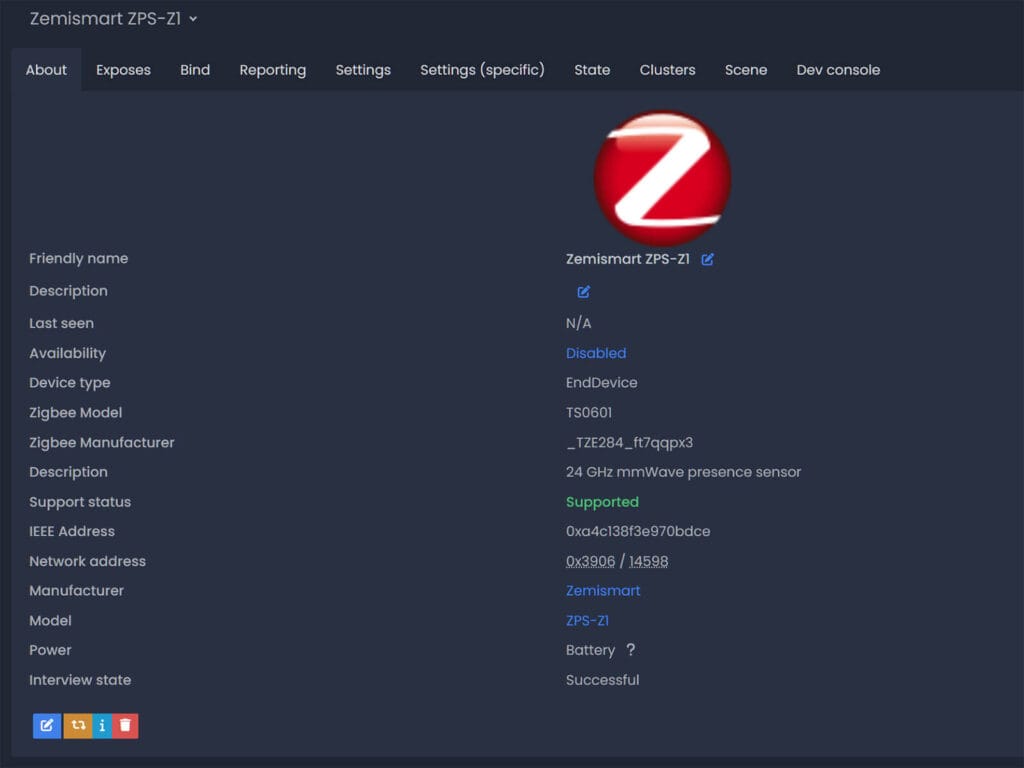
The Zemismart ZPS-Z1 presence sensor has a unique identifier of model TS0601 and manufacturer _TZE284_ft7qqpx3. I used this info to create the external converter, which can be easily changed in case your device has a different one. Once paired to Zigbee2MQTT through my external converter, it exposes a bunch of entities, most of which are used for fine-tuning the sensor. I made sure every single possible datapoint is exposed and handled properly in Zigbee2MQTT, to fully utilize the capability of this device:
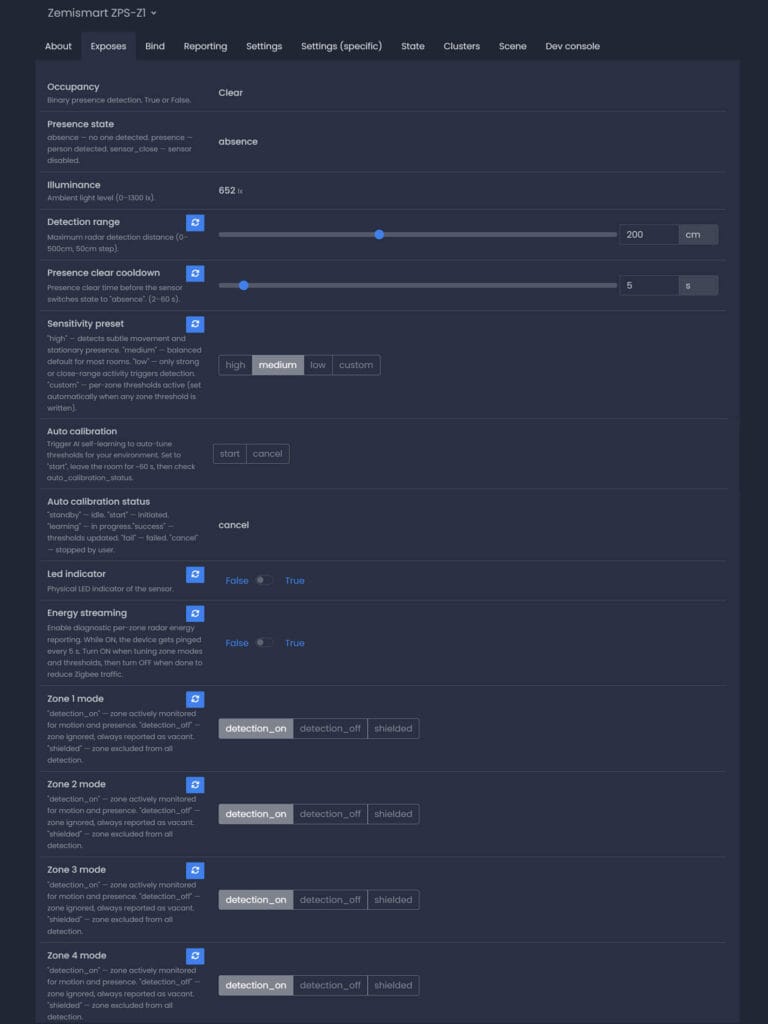
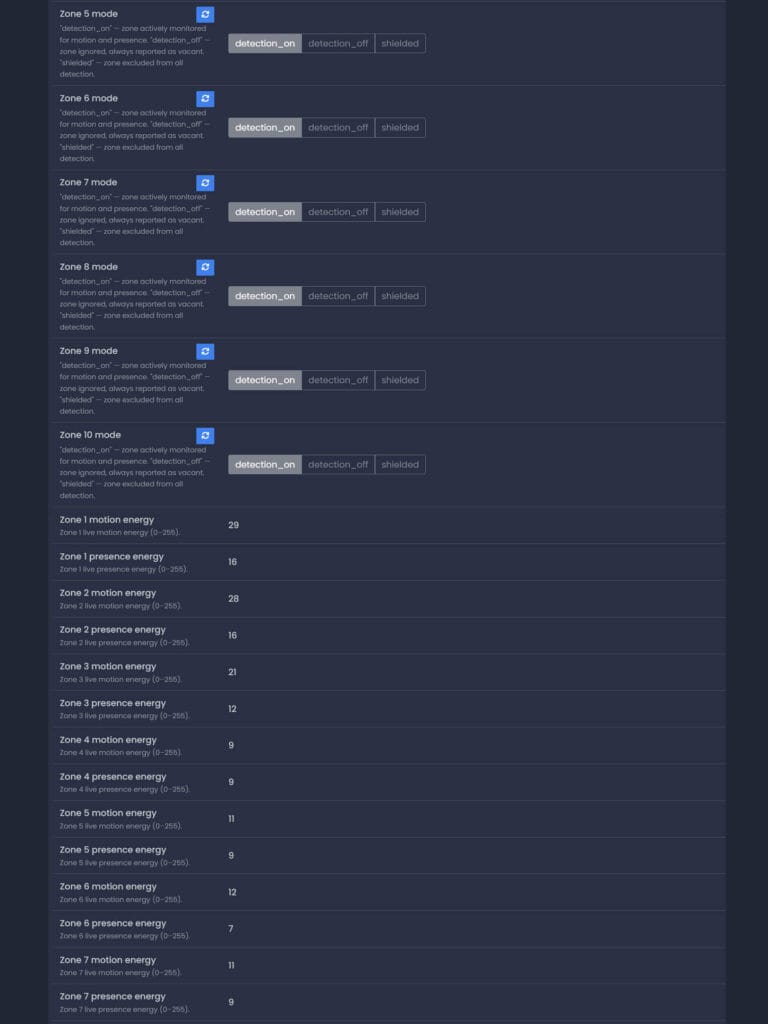
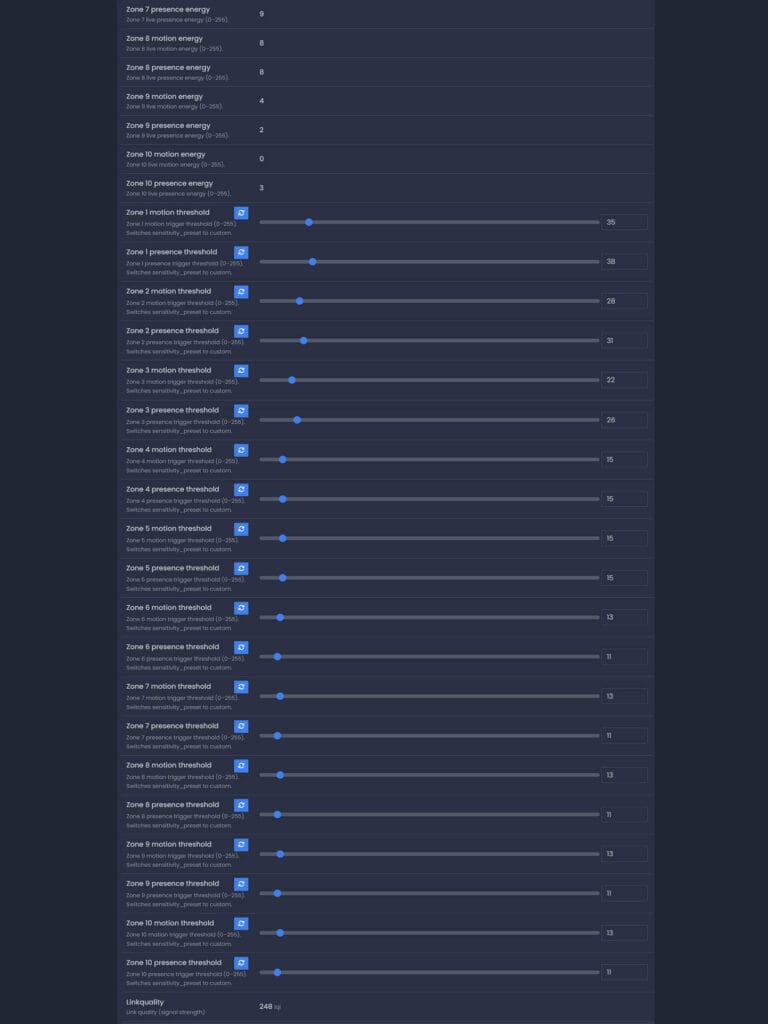
The exposes list seems quite overwhelming at first glance, but the device is actually rather simple. Most entities are used for configuring and fine-tuning the mmWave radar, which you can simply set to auto or don’t touch at all. These exposes are energy gates for eliminating radial detection zones, lowering or increasing the sensitivity per zone or masking it completely.
Presence, occupancy and light level
- Occupancy — This is the main binary sensor.
Occupiedwhen someone is detected,Clearwhen the room is empty. This is what you’d use in automations to turn lights on when occupied and off when absent. - Presence state — A more detailed, text-sensor of occupancy with three possible values.
Absencemeans nobody is there,presencemeans someone is detected, andsensor_closemeans the sensor has been disabled or covered. - Illuminance — Ambient light level in
lux. Useful for combining with occupancy, for example only turning lights on when the room is both occupied and below a certain brightness threshold.
Auto-calibration
- Auto calibration — This setting triggers the sensor’s built-in AI self-learning routine. Set it to
start, leave the room empty for about 60 seconds, and the sensor learns the background radar signature of your specific room and adjusts its thresholds accordingly. Set it tocancelto stop early. NOTE: It’s important to wait 10 minutes after the initial pairing before starting auto calibration. - Auto calibration status — This is a read-only feedback on what calibration is actually doing. Possible values are
standbywhen idle,startwhen just initiated,learningwhen in progress,successwhen done and thresholds have been updated,failwhen something went wrong, andcancelwhen stopped by the user.
Manual detection tuning
- Detection range — This adjusts how far the sensor looks, in centimeters. Capped at 500 cm (actual firmware limit of the radar) regardless of what the spec says, and adjustable in 50 cm steps. I highly suggest setting this to the maximum 500cm and enabling the zones individually.
- Presence clear cooldown — How many seconds the sensor waits after it stops detecting anyone before switching to absent. Too short and lights will flicker when you sit still. Too long and lights stay on after you leave. Settable between 2 and 60 seconds.
- Sensitivity preset — A quick overall sensitivity setting.
Highpicks up subtle movement and still presence,mediumis the balanced default which I recommend using, andlowonly triggers on strong or close-range activity. This switches automatically tocustomwhen you start tweaking per-zone thresholds. - Energy streaming — Turns on live per-zone radar energy reporting. While enabled, the sensor gets pinged every 5 seconds to keep the data flowing. Turn it on when actively tuning and turn it off when done, as it generates constant Zigbee traffic with no benefit during normal use. This will eat up battery if left on!
- Zone motion energy (Zone 1-10) — A live readout of the radar energy level the sensor is currently measuring for motion in each zone. Use this while tuning to see exactly which zones are active and by how much, then compare against your thresholds to understand why the sensor is or is not triggering.
- Zone presence energy (Zone 1-10) — Same as motion energy but for the stationary presence radar signature per zone. I found sitting quietly in front of the sensor and watching these values is the best way to figure out what presence thresholds actually make sense for your environment.
- Zone active (Zone 1-10) — The sensor divides its detection area into 10 radial zones, with Zone 1 being closest to the sensor face and Zone 10 being the furthest. Each zone can be enabled independently. When on, the zone is actively monitored, when off completely excluded from all detection.
- Zone motion thresholds (Zone 1-10) — The motion sensitivity threshold for each individual zone, from 0 to 100. Higher values mean the zone requires stronger motion energy before it triggers. Lowering a threshold makes a zone more sensitive, raising it makes it less sensitive. Writing any threshold value automatically switches the sensitivity preset to
custom. - Zone presence thresholds (Zone 1-10) — Same concept as motion thresholds but for stationary presence detection. Tuning these is what allows the sensor to reliably detect someone sitting quietly at a desk without false positives from background noise.
ZPS-Z1 in ZHA
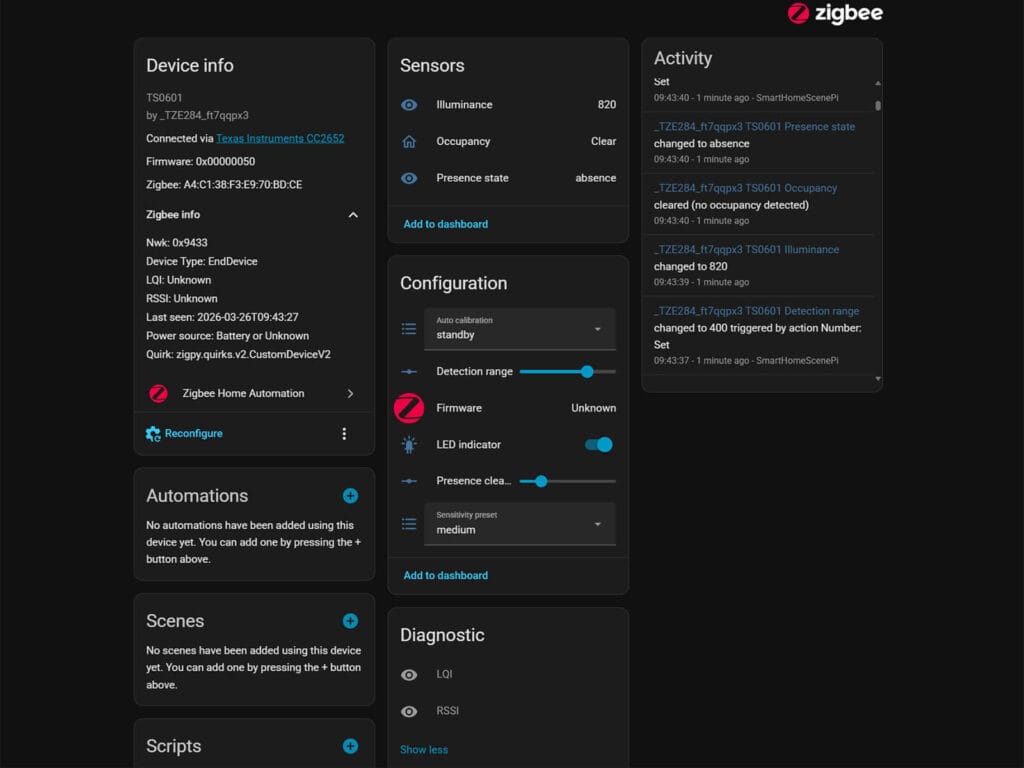
Once my custom quirk is successfully applied and the sensor is paired to ZHA, you can start using it. Like I mentioned earlier, fine-tuning per zone isn’t available in ZHA, as I couldn’t find a reliable way to send raw multi-byte payloads to the device through ZHA without breaking things. Perhaps someone can implement these datapoints as well.
You do get the two presence sensor entities, the auto-calibration feature (which works great btw), the detection range, presence clear cooldown and sensitivity settings. You can also turn on/off the LED indicator which can be annoying as it lights up red each time presence is initially detected.
Configuration and Best Settings
The single most valuable thing you can do before tweaking any settings is run the auto-calibration from a completely empty room. The sensor is very good in eliminating interference, so this feature works incredibly well. I suggest a presence clear cooldown cooldown of 30 seconds, regardless of zones and thresholds to avoid false triggers and quick “blinks” of the presence state. You also need to set the range to the maximum 500cm and turn of each zone individually.
Leave the room, wait about 60 seconds, make sure presence is clear and start the process to let the sensor learn what background radar reflections look like with nobody present. This gives it a solid baseline and dramatically improves still-presence detection.
NOTE: Allow the sensor to warm up for at least 5–10 minutes after pairing before running calibration for the first time. I found out that attempts on a “cold” device tend to get stuck to start. Subsequent runs finish without issues.
If you are tuning each zone manually, enable energy streaming and watch the live motion and presence energy values per zone while you move around and sit still in the areas you want monitored. The values run from 0 to 100, matching what you would see in the Tuya app. Zones that cover walls, furniture, or areas outside your room will show some energy value even when nobody is present. Those are your false-trigger candidates.
Block them using the zone active toggles. For zones where you do want detection, set the thresholds a little below the peak energy values you observe while sitting still. Somewhere around 10-20% below the peak is a good starting point. NOTE: Turn energy streaming off when you’re done tuning to reduce Zigbee traffic and save battery.
I also suggest turning off the LED indicator. It’s valuable to keep during tuning and calibration, but it wastes battery and is frankly, quite annoying. The Illuminance entity updates only on presence state changes to save battery, which is great, as I consider light level automations overrated. Finally, it’s worth clarifying that battery level is not reported by this sensor on any datapoint.
Testing and Benchmarks
At first, the ZPS-Z1 gave me sporadic results. It would quickly trigger on and off, report no presence when I was sitting in front of it, changing state to unoccupied. It turns out I didn’t let the automatic calibration process finish properly, because I kept clicking through the configuration options to test out my converter. This resulted in some weird energy values being recorded and false triggers all over the place.
Ultimately, I reset the device, re-paired it, and went through the auto-calibration process properly this time. The trick here is to wait 5-10 minutes after the initial pairing for the sensor to settle properly. Once done, I tweaked the range and sensitivity a bit and the device started working as expected. I installed it in my office, next to the Aqara FP300. Here’s what I recorded in Home Assistant:

The first 4 hours or so were me tinkering with the external converter, which results in the choppy graph you see in the image. Once I made sure every datapoint was working properly, dialed in and calibrated the sensor, it operated quite impressively.
Final Thoughts
The Zemismart ZPS-Z1 is a capable battery-powered mmWave presence sensor, but like most Tuya devices it takes some work to unlock its full potential outside the official app. My external converter exposes everything the device has to offer (zone-level tuning, live energy monitoring, per-zone sensitivity thresholds, auto-calibration etc.). I am sharing it freely with anyone who needs it and it should be added with the next Z2M update.
The ultra-low power rating of this device is probably the most impressive thing about it. The 4µA draw in presence detection mode is comparable to a traditional passive infrared motion sensor, which is quite rare for a 24GHz mmWave radar. This is difficult to verify in a short testing period, but the single CR2450 battery held up well throughout all the abuse of my review: multiple pairings, resets, calibration runs, and constant manual tweaking. That’s a promising sign for real-world battery life.
If you’re looking for an affordable presence sensor that works well with Zigbee2MQTT and Home Assistant, the ZPS-Z1 is worth considering. I also made a working ZHA quirk, though note that zone configuration is only possible through Z2M at the moment.









just came across this site, really like the in-depth technical analysis, thanks!
could i ask whether this sensor trigger really fast initially to make hallway light feel instant?
i have been on the hunt for fast sensors, so far this is what I gathered
top tier: aqara e1, philips hue indoor
good: aqara p1, ZG-204ZV, eve motion sensor (thread)
bad: most generic tuya zigbee ones on aliexpress (i’m usually half way across the hallway already when the light turns on)
i see that you have also covered quite a lot of pir sensors, i wonder if your experiences with pir sensors are similar to mine
Yes it does trigger quite fast.
However, the models you listed are all PIR motion sensors, not mmWave presence sensors.
If you are looking for a simple motion sensor, I’d get the Aqara P1 and be done with it.
You can’t beat it on speed.
Thanks for getting back to me so quickly.
Aqara P1 actually isn’t the fastest I have tested. E1 (https://www.zigbee2mqtt.io/devices/RTCGQ15LM.html) is at least 100ms faster than P1, despite being much cheaper in the Chinese market.
Philips Hue is the only other PIR sensor I have at hand that is comparable to E1, but it is like 10x the price of E1.
Are there any Tuya PIR sensors that you have tested give a instant-on feel? I’m really keen to know if you have another model in mind.
I bought a bunch of different models on AliExpress over the last months, only until today I have received one that feels really fast: ZG-204ZL zigbee2mqtt.io/devices/ZG-204ZL.html
There are other chipsets that use the same case as ZG-204ZL but none of them are fast. Some slow Tuya ones only report the motion after like 0.5s, which is way too slow for instant-on feel.
Michael
Not really, as my focus has never been motion sensors. They are rather simple devices, without a lot of variety, which is why I prefer tinkering with mmWave radar presence sensors.
I’m curious now, why do you need to get the absolute best trigger times? What’s your particular use case?
A 100ms response delay can be attributed to many factors, the most common one being the actual Zigbee communication to the coordinator.
It’s almost certainly not a sensor delay as PIRs are instant, but rather a connectivity challenge you need to overcome.
Sorry I have no Tuya models I can offer as alternatives.
My use case: motion light in bathrooms, toilets, hallways, etc. where lights turn on instantly when I enter the area is very important.
The delay between when I enter the room and when the light turns on matter a lot. 100ms delay is bearable, but more than that just make it feel less refined. If it is more than 200ms, it simply triggers my OCD.
A bit of backstory, the very first sensor I tested was a Xiaomi one (https://www.zigbee2mqtt.io/devices/RTCGQ01LM.html#xiaomi-rtcgq01lm), from like 5+ years ago. It had always worked flawlessly and triggered instantly. Because of that, I always thought all PIR sensors were like that until I dug deeper in recent years because I needed to add more sensors to my house.
Some Tuya models would trigger a whole second after the Xiaomi / Aqara ones. For hallways, that means I have already taken 3 – 4 steps. If the motion light turns on when I’m already halfway through my hallway, it just feels useless.
In case anyone will find this useful, here are the really bad ones I have ruled out:
– https://www.zigbee2mqtt.io/devices/ZP01.html#tuya-zp01
– https://www.zigbee2mqtt.io/devices/SNZB-03P.html#sonoff-snzb-03p
– https://www.zigbee2mqtt.io/devices/SNZB-03.html#sonoff-snzb-03
– https://www.zigbee2mqtt.io/devices/ZMS-102.html#tuya-zms-102
– https://www.zigbee2mqtt.io/devices/IH012-RT02.html#tuya-ih012-rt02
As you can see, it includes known brands such as Sonoff and Moes.
To be honest, performance wise Aqara E1 is sufficient. But my curiosity has led me to do a thorough review of affordable PIR sensors on the market.
In Australia, Aqara E1 is like $15. Philips Hue is $60. The new Tuya one (https://www.zigbee2mqtt.io/devices/ZG-204ZL.html#tuya-zg-204zl) I found is only $5 from AliExpress.
Finally, I also acknowledge the Zigbee network and link to coordinator could affect the performance. In most of my tests, I tried to pair them directly to the coordinator and stay really close to the coordinator. So, ruled out as much external factor as possible.
My theory is that, there are some chipsets / implementations that are simply not good enough. Aqara has done a great job to optimise both battery and speed. I have yet to see a Tuya zigbee device that can really compete with Aqara when considering both battery and performance.
Long post, thanks for reading till the end. Hope you find it interesting, too.
Thanks for the write-up, very insightful! And I’m sure other readers will find it valuable!
You are correct that some chipsets are worse than others and can introduce delays.
However, the core difference lies in the actual firmware implementation as you mentioned, which why I’m surprised to learn you had bad experience with Sonoffs (they follow the ZCL spec).
For reference, Aqara uses non-standard ZCL clusters for all their devices, which leads to some great battery optimizations but also to “picky” communicators.
They refuse to re-path through some routers, or can be finicky in communicating with the coordinator.
Even still, I’d focus a bit more on the actual Zigbee network.
I think you will find this article valuable:
https://smarthomescene.com/guides/how-to-build-a-stable-and-robust-zigbee-network/
Cheers and Happy Friday!
Another interesting observation.
The sensors that start with ZG-, which has vendor HOBEIAN listed in Z2M, seem to produce much higher quality zigbee PIR sensors.
This is aligned with quite a few of the posts you did in the past, too.