

Sonoff has been refreshing its entire Zigbee sensor lineup over the past year, and the door and window sensor is the latest to get an update. The SNZB-04PR2, branded as the SenseGuard DW Gen2, replaces the SNZB-04P with a slimmer body and magnet, a switch from coin cell to AAA batteries, and active tamper detection.
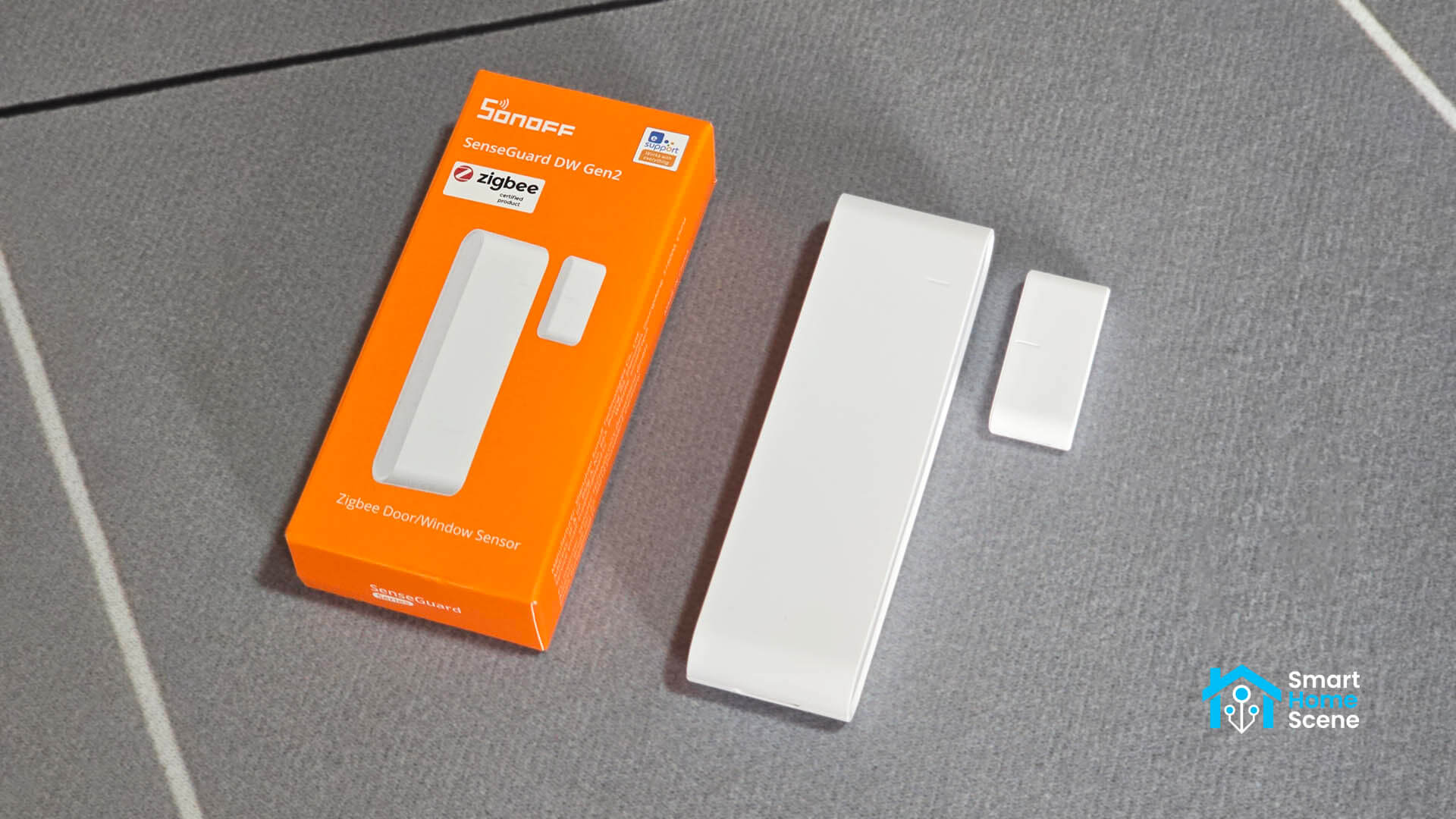
For Home Assistant users pairing it locally via Zigbee2MQTT or ZHA, the question is straightforward: does it work better than what came before, and is it worth picking up over the competition? I tested it on both integrations to find out.
The SNZB-04PR2 costs $13.90 and you can get it on Sonoff’s Official Website, Amazon US, Amazon DE, Amazon FR, Amazon IT, Domadoo or AliExpress.
SNZB-04PR2 vs SNZB-04P: What Actually Changed
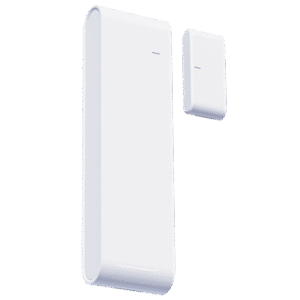
The SNZB-04P was already a solid contact sensor, but the Gen2 is definitely an upgrade. The most immediately noticeable change is the physical size. The SNZB-04PR2 measures 90 x 26 x 13.5mm compared to the SNZB-04P’s 50.5 x 32 x 21.9mm footprint. It is longer but noticeably thinner and narrower, which makes it sit much more flush against a door or window frame.
The battery format is the bigger functional change. The SNZB-04P used a CR2477 coin cell, which Sonoff rated for up to five years but required a specific and less common battery. The SNZB-04PR2 moves to two standard AAA batteries, rated for three years. You trade some longevity on paper for a battery format you can replace anywhere. For anyone running a dozen or more of these around the house, that is a practical win.
The Gen2 SNZB-04PR2 also supports both horizontal and vertical magnet mounting, which gives you more flexibility on doors and frames with unusual geometry. Detection range differs between the two: 30mm horizontally, 15mm vertically. If you are mounting on a surface with a tight gap or an uneven frame, horizontal is the better choice where possible.
The most significant new feature is tamper detection. If the sensor is physically removed from the surface it is mounted on, it triggers a tamper alert. This is useful for security and safety automations. More on how that actually works in practice below.
The chip has also changed. The SNZB-04P used a Silicon Labs EFR32MG22, while the new SNZB-04PR2 uses the Telink TLSR8656 [Datasheet], the same SoC Sonoff has been moving toward across several recent releases including the SNZB-02WD and SNZB-02LD thermometers and the AirGuard TH Zigbee sensor. It is a well-understood chip in the Zigbee ecosystem at this point.
Design and Build Quality
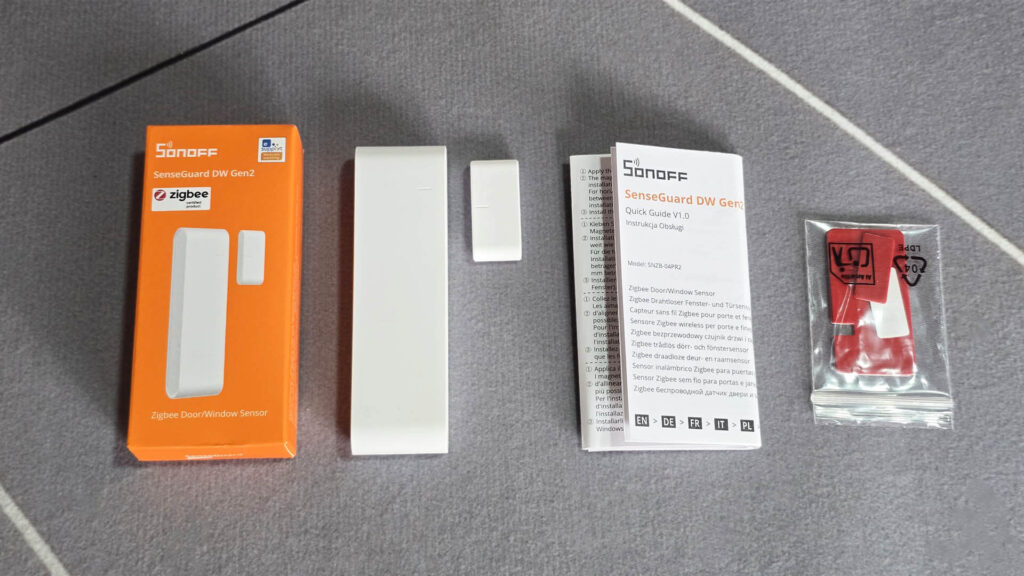
The SONOFF SNZB-04PR2 comes in a small box with the sensor, magnet, mounting stickers, a user manual, and a pair of AAA batteries pre-installed. Once you pull the protective contact foil from the battery compartment the device is ready to pair.
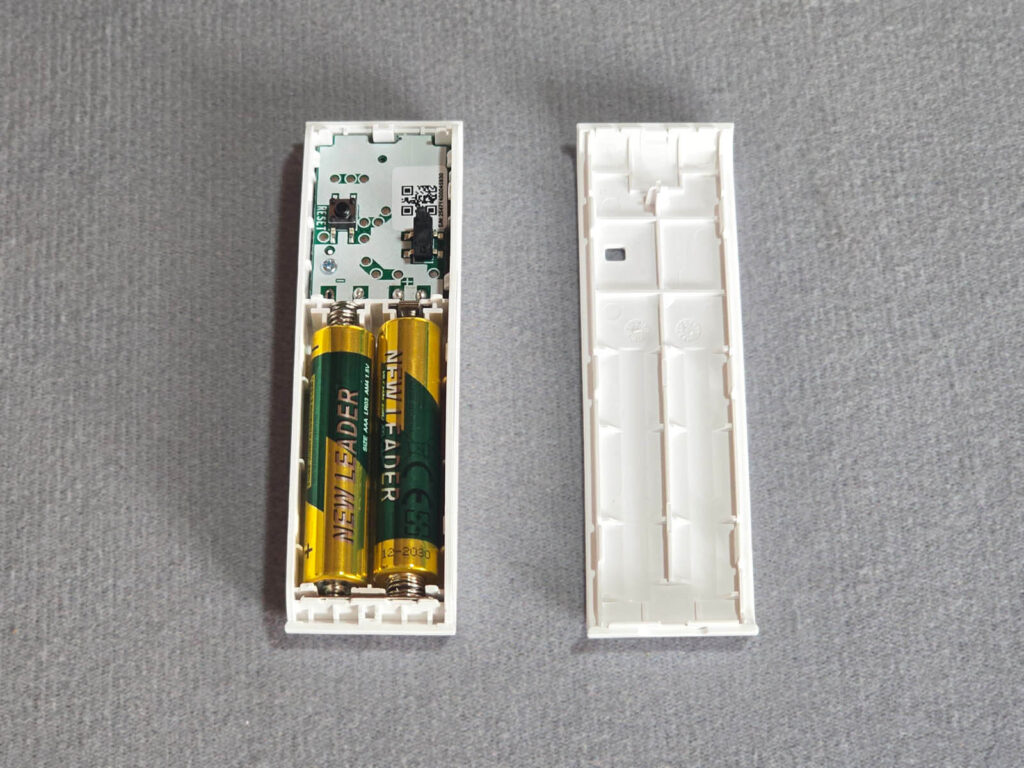
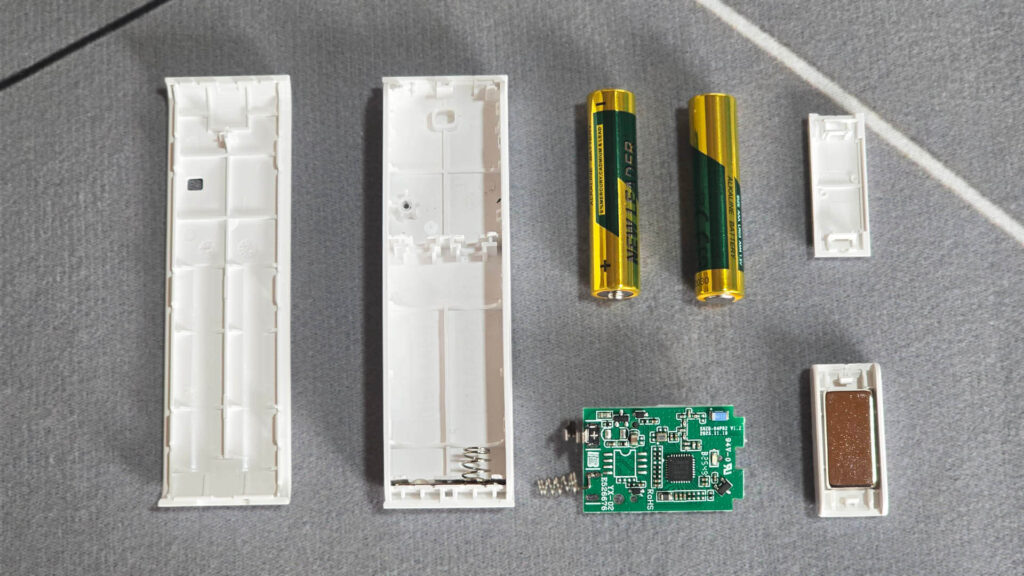
The device is only as thick as it needs to be to fit two AAA batteries. Pop the cover off and that becomes obvious, the batteries take up nearly the entire depth and the PCB itself is tiny. The two buttons you see on the board are the pairing button and the anti-tamper button.
The PCB is small and clean, marked SNZB-04PR2 V1.2 with a production date of 2025.11.19. As I mentioned earlier, the main chip is the Telink TLSR8656, the same SoC Sonoff has been using in its recent sensor lineup like the SNZB-02WD and SNZB-02LD thermometers.
Detection is handled by a Hall effect sensor rather than a traditional reed switch. Instead of two physical contacts closing when a magnet is nearby, a Hall effect chip detects the magnetic field electronically with no moving parts. That means no mechanical wear over time and no contact bounce, which reed switches can suffer from.
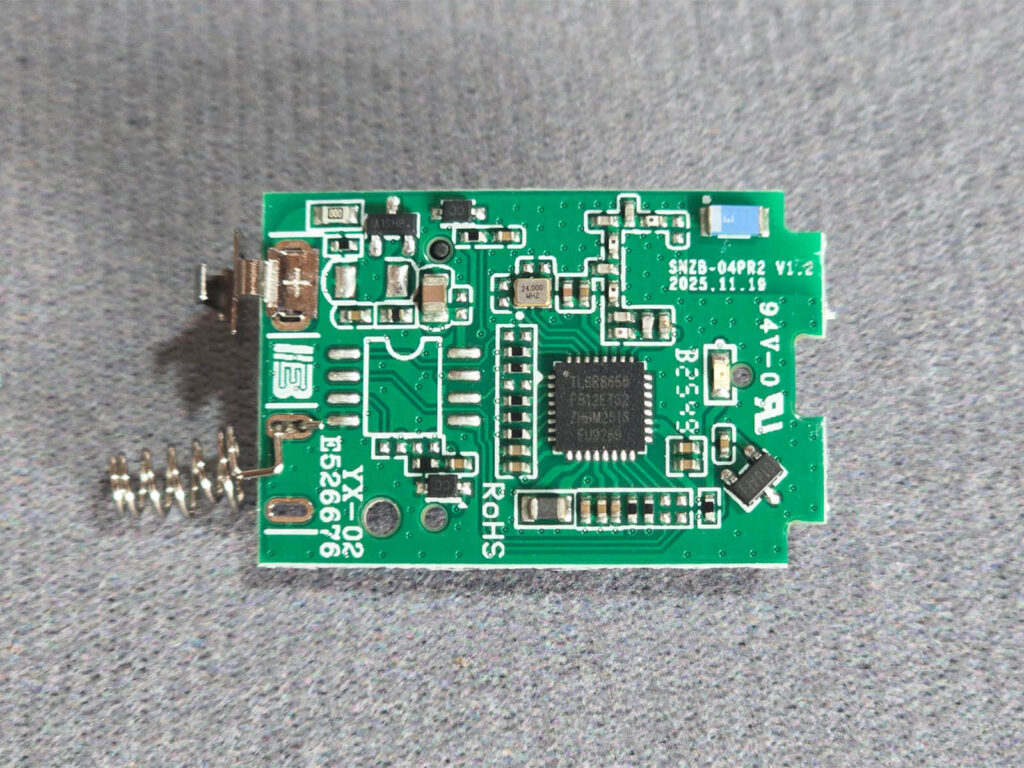
Once you pull it apart completely, it is clear just how small the PCB is relative to the rest of the housing. The magnet is a neodymium piece and a strong one at that. Worth noting during installation: it will snap toward the batteries if you bring it too close, so keep that in mind when positioning it on the frame.
Pairing with Zigbee2MQTT
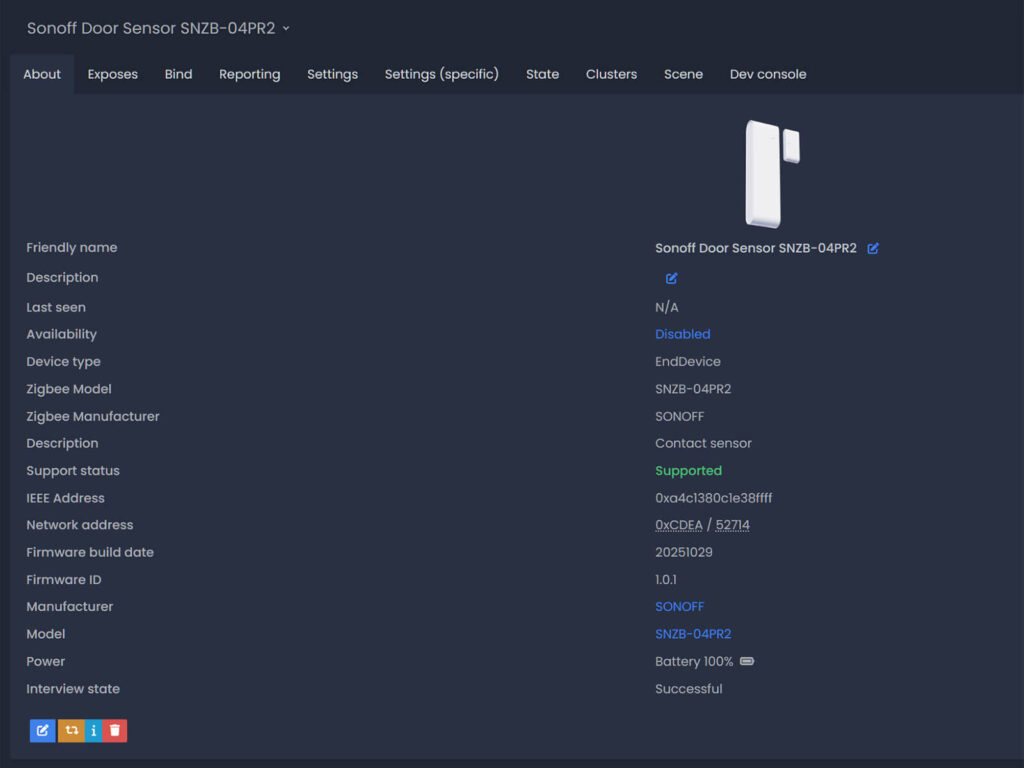
I tested the SNZB-04PR2 in Zigbee2MQTT using the SLZB-Ultima, SMLight’s latest EFR32MG24-based powerhouse of a coordinator. You hold the button on the sensor for five seconds until the LED blinks, enable joining in Zigbee2MQTT, and the device is interviewed and paired within seconds.
It is identified correctly as model SNZB-04PR2 by manufacturer SONOFF, operating as an EndDevice as expected for a battery-powered sensor. Since it is an EndDevice, it cannot relay traffic for other devices in your mesh. If you are deploying several of these in areas far from your coordinator, make sure you have routers nearby. The Zigbee network guide covers this and much more if you need a refresher.
The device shipped with firmware 1.0.1 (build date 20251029). Zigbee2MQTT confirmed it was already on the latest available version, so no OTA update was needed out of the box. If you recently updated Zigbee2MQTT and are looking at an unfamiliar frontend, check out the guide on restoring the classic Zigbee2MQTT UI.
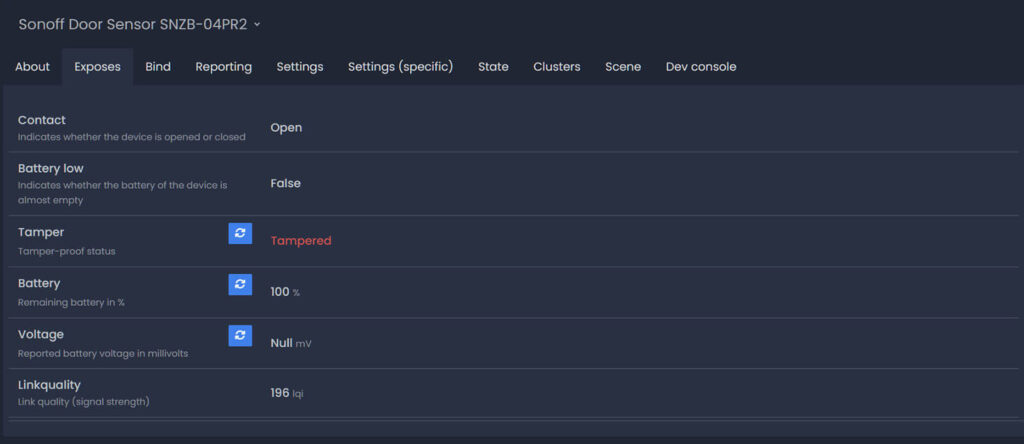
The Exposes tab in Zigbee2MQTT gives you five entities:
- Contact: binary open/closed state
- Battery low: boolean low battery indicator
- Tamper: tamper status
- Battery: remaining battery percentage
- Voltage: reported battery voltage in millivolts
Link quality on my setup reported 168 LQI at 4 meters, which is a strong signal. Communication has been flawless with instant state updates in Home Assistant, even for the tamper switch.
Pairing with ZHA
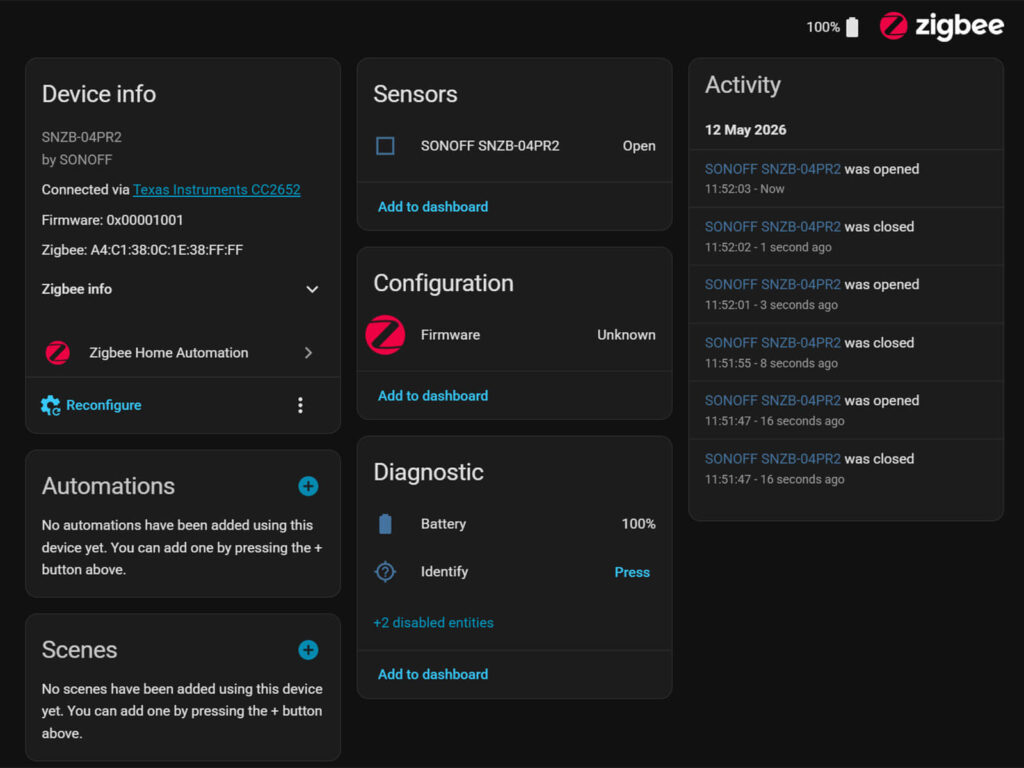
Pairing in ZHA was straightforward with no issues getting the device recognized and added. My ZHA testing instance runs on the Dongle Plus MG24 at the moment. Out of the box, ZHA exposes the contact binary sensor and battery level. As the main sensor is there, the integration is functional but incomplete.
The SNZB-04PR2 reports tamper through a manufacturer-specific cluster (0xfc11) that ZHA does not handle natively. To expose it, you need to install a custom quirk. The quirk defines that cluster, reads attribute 0x2000 as a Boolean, and exposes it as a tamper binary sensor under the Diagnostic entity category. Once applied, ZHA gives you contact, tamper, and battery. Voltage reporting remains absent even with the quirk, which is a minor gap compared to Zigbee2MQTT’s full five-entity exposure.
Here’s the official quirk from Sonoff:
Sonoff SNZB-04PR2 Custom Quirk (click to expand)
"""Sonoff SNZB-04PR2 device."""

from zigpy import types
from zigpy.quirks import CustomCluster
from zigpy.quirks.v2 import (
    BinarySensorDeviceClass,
    EntityType,
    QuirkBuilder,
    ReportingConfig,
)
from zigpy.zcl.clusters.general import OnOff
from zigpy.zcl.foundation import BaseAttributeDefs, ZCLAttributeDef


class SonoffContactCluster(CustomCluster):
    """Sonoff manufacturer specific cluster for contact sensor."""

    cluster_id = 64529  # 0xfc11
    name = "Sonoff contact cluster"
    ep_attribute = "sonoff_contact_cluster"

    class AttributeDefs(BaseAttributeDefs):
        """Attribute definitions."""

        tamper = ZCLAttributeDef(
            id=0x2000,
            type=types.Bool,
            is_manufacturer_specific=True,
        )


(
    #  <SimpleDescriptor endpoint=1 profile=260 device_type=1026
    #  device_version=0
    #  input_clusters=[0, 1, 3, 32, 1280, 64529, 64567]
    #  output_clusters=[3, 6, 25]>
    # QuirkBuilder("eWeLink", "SNZB-04PR2")
    QuirkBuilder("SONOFF", "SNZB-04PR2")
    .prevent_default_entity_creation(endpoint_id=1, cluster_id=OnOff.cluster_id)
    .replaces(SonoffContactCluster, endpoint_id=1)
    .binary_sensor(
        "tamper",
        SonoffContactCluster.cluster_id,
        endpoint_id=1,
        reporting_config=ReportingConfig(
            min_interval=0, max_interval=900, reportable_change=1
        ),
        device_class=BinarySensorDeviceClass.TAMPER,
        entity_type=EntityType.DIAGNOSTIC,
        fallback_name="Tamper",
    )
    .add_to_registry()
)
Once you add it, reboot Home Assistant and re-pair the sensor. If you are considering moving your network to a new coordinator to run Zigbee2MQTT (which I think you should) the Zigbee network migration guide covers the process cleanly.
Real-World Performance
State updates are instant. Open the door, the entity flips to Open in Z2M before you have finished the motion. Close it, it flips back immediately. There is no perceptible delay in either Zigbee2MQTT or ZHA. For a contact sensor this is the baseline expectation, but it is worth confirming since latency on cheaper sensors can be a real problem in security automations where you want the camera recording or the alarm triggered the moment the door opens.
I also purposefully re-paired the sensor through a Tuya router, just to see if it will communicate properly. It did, there were no issues as it really didn’t care what it was paired to. It sent a payload on each trigger event and that’s that.
Tamper Alert Behavior
The tamper mechanism works through a small physical button on the back of the transmitter. When the device is mounted on a surface, that button is compressed. The moment you pull the sensor off the wall or door frame, the button releases and the tamper entity triggers in Home Assistant.
The trigger is also instant and reliable. In testing, every click registered immediately in Zigbee2MQTT. The tamper state cleared once the device was pressed back onto the surface. This is a well-implemented feature for a sensor at this price point, and it makes the SNZB-04PR2 meaningfully more useful for security-oriented setups compared to a basic contact sensor with no tamper awareness.
A Note on Matter
Sonoff advertises Matter over Bridge support for the SNZB-04PR2 via the ZBBridge-U or eWeLink CUBE. This obviously routes the sensor through a proprietary Sonoff hub into the Matter ecosystem, which is the opposite direction of what most Home Assistant users want.
It adds cloud dependency and hardware overhead for functionality that Home Assistant already handles natively and locally. If exposing this sensor to Apple Home or Google Home matters to you, Home Assistant can expose any entity as a Matter device directly without a Sonoff bridge in the picture.
Verdict
The SNZB-04PR2 is a well-executed contact sensor that improves on the SNZB-04P in ways that matter for day-to-day use. The slimmer profile looks better on a door frame, the AAA battery format is more practical than the CR2477, and the tamper detection is genuinely useful rather than just being a feature. Pairing is clean in both Zigbee2MQTT and ZHA, performance is instant, and the Telink TLSR8656 chip has proven itself reliable across Sonoff’s recent lineup.
The main caveat for ZHA users is the reduced entity exposure. Tamper detection requires the custom quirk, so if you rely on ZHA and tamper alerts are part of your security setup, factor in that extra step. Zigbee2MQTT users get everything out of the box with no issues.
At around 14 euros it sits at a competitive price for a Zigbee contact sensor with tamper detection. If you are starting fresh and want to compare options, consider the Aqara T1 Door Sensor too, as it has the best battery life out of any contact sensor out there.
Also available on Amazon DE, Amazon FR, Amazon IT, Domadoo or AliExpress.








The IKEA MYGGBETT sensor is smaller, cheaper and runs on a single AAA battery. No tamper sensor though.